
For interior designers comparing tools · vendor pages checked 4 November 2026
Best AI rendering tools for interior design (checked Nov 2026)
Nine AI rendering tools for interior design, with each fact taken from that vendor’s own site as of November 2026. The groups are a room photo, a floor plan, and a CAD model.
Room photo, floor plan, or CAD model
The groups are a room photo, a floor plan, and a CAD model. Inputs, free starts, and prices for all nine tools come from each vendor’s own site as of 4 November 2026. “Not stated” means that page did not say it.
Room photo. Spacely AI’s tutorial, REimagineHome’s FAQ, Collov’s pricing page, Interior AI’s FAQ, and Homestyler’s AI Stager all describe a photo upload. RenderVibe’s studio takes a JPG or PNG of the room.
Floor plan. Render a House’s homepage says it takes floor plans. RenderVibe takes a PDF plan and makes separate concept views of the rooms. The floor plan to rendering guide says the workflow does not export editable geometry, and architectural rendering says the images are not dimensionally verified models. MyArchitectAI’s pricing FAQ lists supported designs as “CAD exports (except for floor plans), line drawings, and hand sketches.”
CAD model. Veras’s product page lists host applications, including Revit and SketchUp, and says the tool works inside those programs. Spacely AI’s Studio and Agency cards list SketchUp, Revit, AutoCAD, and Rhino under software integrations. Render a House’s plans doc describes 3D file import on paid plans and does not describe a plugin. RenderVibe does not describe a CAD plugin. A longer price comparison with two of the photo tools is on RenderVibe and REimagineHome and RenderVibe and Collov.
What each vendor page says
Each linked page was read on 4 November 2026.
| Tool | Input types | CAD plugin | Free start | Entry price | Watermark | Source |
|---|---|---|---|---|---|---|
| Veras | The product page describes a sketch, an image, a prompt, a floor plan, or a 3D model. Veras product page | Yes. The product page lists Revit, SketchUp, Rhino, Archicad, Vectorworks, Forma, and Allplan, and says Veras is available in Enscape, V-Ray, Corona, and a web app. Veras product page | 14 days. The trial page says there is no upfront charge, then a named license is billed annually at $348 and the trial includes 100 credits. Payment starts automatically unless you cancel up to a day before the trial ends. Veras trial page | Veras Starter is listed as $16.90 per month, billed annually at $202.80, with 500 credits. Veras product page Chaos pricing | Not stated on the pages checked. Veras product page | Veras product page; Veras trial page; Chaos pricing as of 4 November 2026 |
| Spacely AI | The 2026 tutorial says to upload a room photo. It also names workflow templates, including Interior Redesign, Virtual Staging, and Sketch to Render. Spacely AI 2026 tutorial | The Personal card marks SketchUp, Revit, and AutoCAD unavailable. The Studio and Agency cards list SketchUp, Revit, AutoCAD, and Rhino under software integrations. Spacely AI pricing | The pricing page lists a Free plan at $0, called free forever, with 40 trial credits. Spacely AI pricing | The pricing page did not show a Personal dollar amount. The plan post says a Personal subscription reverts to $25/month for 500 credits if you cancel and rejoin. Spacely AI pricing Spacely AI plan post | Free and Personal mark watermark-free unavailable. Studio and Agency mark watermark-free included. Spacely AI pricing | Spacely AI pricing; Spacely AI plan post; Spacely AI 2026 tutorial as of 4 November 2026 |
| MyArchitectAI | The pricing FAQ says JPEG, PNG, and WEBP. It lists supported designs as “CAD exports (except for floor plans), line drawings, and hand sketches.” MyArchitectAI pricing | No plugin is described. The vendor’s llms.txt says the product is browser-based, with no installation, and that CAD programs are used by uploading a flat image or file. MyArchitectAI llms.txt | The pricing title says 10 renders for free. The billing article says the free plan is a one-time 10 renders and 10 edits. llms.txt says 10 free renders and no credit card. MyArchitectAI pricing MyArchitectAI billing article MyArchitectAI llms.txt | Starter is listed as $29/month or $290/year. MyArchitectAI pricing | Not stated on the pages checked. MyArchitectAI pricing | MyArchitectAI pricing; MyArchitectAI billing article; MyArchitectAI llms.txt as of 4 November 2026 |
| REimagineHome | The FAQ says to upload a photo. REimagineHome FAQ | Not stated on the pages checked. REimagineHome FAQ | The pricing page says all new users get 5 free designs. The homepage says no credit card is required. The FAQ says 5 free credits. REimagineHome pricing REimagineHome homepage REimagineHome FAQ | Structured data on the pricing page lists Essential at USD 14 per month for 30 credits. The visible Essential card also says 30 credits per month. REimagineHome pricing | The Essential card lists “Watermark-free, shareable images.” The free-design lines do not say the free files are watermark-free. REimagineHome pricing | REimagineHome pricing; REimagineHome homepage; REimagineHome FAQ as of 4 November 2026 |
| Collov | The pricing page describes changes to room photos and refers to each uploaded photo. Collov pricing | Not stated on the pricing page. Collov pricing | The comparison matrix includes “5 Free Trial(with watermark)” on several rows. Other rows use different trial labels. Collov pricing | Standard is listed as $19 per month, billed as $228 yearly. Collov pricing | Trial cells that say “with watermark” are separate from the Standard card, which lists “No watermark.” Collov pricing | Collov pricing as of 4 November 2026 |
| Interior AI | The FAQ says JPG, PNG, WebP, and AVIF photos. It also names a mode that does not need a photo, a sketch-image mode, and a SketchUp mode that takes a screenshot. Interior AI homepage | No plugin is described. The SketchUp line is a screenshot upload, as the FAQ states it. Interior AI homepage | A free allowance was not stated on the homepage checked. Interior AI homepage | The pricing cards list Pro at $49 per month, or $349 per year. Interior AI homepage | Not stated on the homepage checked. Interior AI homepage | Interior AI homepage as of 4 November 2026 |
| Homestyler | AI Studio says AI Stager uploads a room photo. AI Render is described as a design rendering inside Homestyler. A file-type list for AI Render was not on the pages checked. Homestyler AI Studio | No plugin for another CAD program is described. The AI tools are inside Homestyler’s own workspace. Homestyler AI Studio | Basic is free. The pricing comparison lists 3 AI credits in total, and the AI Boost page says Basic includes 3 AI credits. Homestyler pricing Homestyler AI Boost | Pro starts from $4.9 per month with 100 AI credits per month, and Master starts from $9.9 per month with 300 AI credits per month. AI Render is listed at 25 credits for a 2K image. Homestyler pricing | AI Boost lists “Remove watermarks from AI-generated images” on that paid plan. Basic does not list AI watermark removal. Homestyler AI Boost | Homestyler pricing; Homestyler AI Boost; Homestyler AI Studio as of 4 November 2026 |
| Render a House | The homepage says sketches, floor plans, photos, and 3D models. Render a House homepage | No plugin is described. The plans doc says 3D import of SKP, GLB, GLTF, OBJ, and STL is on Pro and Studio, not on Free. Render a House plans doc | The homepage says free forever and 3 credits per day. The plans doc says the same daily allowance and that free renders include a small watermark. Render a House homepage Render a House plans doc | Pro is $39/month or $312/year ($26/mo when billed annually). The higher plan is $99/month or $792/year ($66/mo billed annually). Render a House plans doc Render a House homepage | The plans doc says free renders include a small watermark, and that watermark removal is on Pro and Studio. Render a House plans doc | Render a House homepage; Render a House plans doc as of 4 November 2026 |
| RenderVibe | A room photo or a PDF plan. The studio states JPG, PNG, or PDF, up to 20 MB per file. RenderVibe studio | No. The pages checked describe a browser upload. They do not describe a CAD plugin. RenderVibe studio | One free credit for accounts created through Dec 31, 2026, 11:59 PM MT, with a watermark-free download at full resolution. RenderVibe pricing | Starter pack is US$4 once for 5 credits. After the free credit, buy a credit pack or subscribe. RenderVibe pricing | The free-credit download is watermark-free at full resolution. A subscription or a credit pack also unlocks watermark-free, full-resolution downloads. RenderVibe pricing | RenderVibe pricing; RenderVibe studio as of 4 November 2026 |
Veras
On 4 November 2026, the Veras product page described work from a sketch, an image, or a prompt, and from a 3D model to an image. The same page lists Revit, SketchUp, Rhino, Archicad, Vectorworks, Forma, and Allplan, and says Veras is available in Enscape, V-Ray, Corona, and a web app. It also describes turning a sketch, floor plan, or image into a scene for Revit, Rhino, or SketchUp.
Veras trial page says to try Veras free for 14 days, with no upfront charge, and that payment starts automatically after the free period unless you cancel up to a day before the trial ends. The named-license trial includes 100 credits and is then billed annually at $348. Veras product page and Chaos pricing list Veras Starter at $16.90 per month, billed annually at $202.80, with 500 credits for image or video generation. Veras Pro is listed at $29 per month, billed annually at $348, with 2,000 credits. The $348 trial figure matches the Pro annual price. Starter bills $202.80 a year. Neither page mentions watermarks. Both pages say prices exclude tax and may change.
Spacely AI
On 4 November 2026, Spacely AI pricing listed a Free plan at $0, called free forever, with 40 trial credits. On that card, high-resolution download, private mode, a commercial license, and watermark-free output are marked unavailable. The Personal card also marks watermark-free unavailable, and it marks SketchUp, Revit, and AutoCAD unavailable. The Studio and Agency cards mark watermark-free as included and list SketchUp, Revit, AutoCAD, and Rhino under software integrations. The pricing page also lists an Education plan at $30, with the line “Everything in Studio Plan included” and “Fresh 1500 credits monthly.” Top-up bundles on the same page start at $9 for 200 credits.
The pricing page did not print a Personal, Studio, or Agency dollar amount in the copy retrieved on 4 November 2026. Spacely AI plan post says that from 15 July 2026, Personal is 500 credits per month and reverts to $25/month if you cancel and rejoin, Studio is 1,500 credits per month and reverts to $50/month, and Agency is 3,500 credits per month at $100/month. Spacely AI 2026 tutorial, dated 10 April 2026, still says most renders use 2–8 credits, that 30 free credits cover a few renders, and that paid plans start at $15/month or $45/month. The July plan post and the pricing page are later than that April tutorial. The April tutorial does say to upload a room photo, and it names templates that include Interior Redesign, Virtual Staging, and Sketch to Render.
MyArchitectAI
On 4 November 2026, MyArchitectAI pricing was titled “Get 10 Renders For Free” and the page description says plans from $29/month, a free testing plan, and zero installs. The monthly cards list Starter at $29/month, Studio at $49/month, and Team at $99/month for 5 seats. The annual view on the same page lists Starter at $290/year, Studio at $490/year, and Team at $990/year. The pricing FAQ says supported files are JPEG, PNG, and WEBP, and lists supported designs as “CAD exports (except for floor plans), line drawings, and hand sketches.”
MyArchitectAI billing article says the free plan is a one-time 10 renders and 10 edits, and that paid plans include unlimited renders, edits, and enhancements. That article still names a legacy Pro plan and a Scale plan. Those names are not on the pricing cards checked here. MyArchitectAI llms.txt says the product is browser-based, needs no installation, works with listed CAD programs by flat image or file upload, and that the free trial is 10 renders with no credit card. None of these three pages mentions watermarks.
REimagineHome
On 4 November 2026, REimagineHome pricing said all new users get 5 free designs, on the same AI as paid plans. The visible cards name Essential at 30 credits per month, Pro at 200, Advanced at 400, and Agency at 900. The Essential card lists “Watermark-free, shareable images” among its lines. The free-design sentences do not mention a watermark, and the pages we checked do not say whether free files carry one. The same page’s structured data lists an Essential offer at USD 14 per month for 30 credits, which matches the visible 30-credit card. It also lists a USD 29 offer for 200 credits under a different name, a USD 49 offer for 500 credits, and a USD 99 offer for 1,200 credits. Those last two credit counts do not match the visible Advanced and Agency cards. The visible card text retrieved on 4 November 2026 did not print those dollar amounts.
REimagineHome homepage says 5 free designs and no credit card required. REimagineHome FAQ says to upload a photo, and that new users get 5 free credits to try all features. The FAQ also says outputs are royalty-free for commercial use. It does not describe a CAD plugin. A sample line on the homepage mentions a floor plan in a prompt. The how-it-works answer still says to upload a photo.
Collov
On 4 November 2026, Collov pricing showed a first plan at $19 per month, billed as $228 yearly, with the matrix button labeled Subscribe Standard. The Standard list includes unlimited regeneration, “No watermark,” a commercial photo license, and high-resolution downloads. The page describes adding or removing furniture from room photos and answers a question about each uploaded photo. It does not describe a CAD plugin.
The comparison matrix lists several different allowances. Several cells read “5 Free Trial(with watermark).” Other cells read “2 Free Trial,” “1 Free Trial (6 images, watermarked),” or “1 Free Trial(with watermark).” The paid “No watermark” line sits in a different cell from the trial cells. The page does not say whether the trial requires a card.
Interior AI
On 4 November 2026, the Interior AI homepage said to upload a photo of a room. The FAQ says accepted photo files are JPG, PNG, WebP, and AVIF. The same answer names modes: one that keeps more of the current room, one that changes more of it, virtual staging, a mode that does not need a photo, Sketch2Image for a sketch, and a SketchUp mode. The SketchUp sentence says to take a screenshot and select SketchUp mode. The FAQ does not describe a plugin for another program.
The pricing cards on that page list Pro at $49 per month, or $29 per month billed yearly at $349, for 1,000 interior designs. Premium is $99 per month, or $49 per month billed yearly at $599, for 5,000 designs. Ultra is $199 per month, or $99 per month billed yearly at $1,199, for 25,000 designs. Pro’s card includes a commercial-use license and “Upload your own room interior.” A different sentence on the same page says the Pro plan is $390 a year. That amount does not match the $349 yearly card. The homepage does not state a free allowance or a watermark rule.
Homestyler
On 4 November 2026, Homestyler AI Studio said AI Stager uploads a room photo, and that AI Render generates design renderings inside Homestyler. The same page says AI Planner can generate a floor-plan idea from a written brief and open it in Homestyler’s floor planner. It says new registered users may receive a free trial of selected AI features, and that some generation requires AI credits or a paid plan. It does not state how many free uses that trial includes, and it does not describe a plugin for another CAD program.
Homestyler pricing lists a free Basic plan with unlimited 1K rendering, and a comparison row of 3 AI credits in total. Pro starts from $4.9 per month with 100 AI credits per month, and Master starts from $9.9 per month with 300 AI credits per month. The AI credits note on that page prices AI Render at 25 credits for a 2K image and 35 credits for a 4K image, and AI Stager at 10 credits per image. Homestyler AI Boost says Basic includes 3 AI credits and that failed AI generations return credits. AI Boost starts from $4.9 per month, includes 1,500 AI credits per month marked as a limited-time offer, and lists “Remove watermarks from AI-generated images.” Basic does not list that removal line.
Render a House
On 4 November 2026, the Render a House homepage said the tool turns sketches, floor plans, photos, and 3D models into renders, and that the free start is 3 credits per day.
Render a House plans doc says prices are in USD. It lists Free at $0 with 3 credits per day, resetting every 24 hours, and says those renders include a small Render a House watermark. It lists Pro at $39/month or $312/year ($26/mo when billed annually), with 240 credits, and the higher plan at $99/month or $792/year ($66/mo billed annually), with 1,000 credits. Watermark removal, and 3D import of SKP, GLB, GLTF, OBJ, and STL, are marked on Pro and Studio and not on Free. The doc tells readers to check a pricing URL for current prices. That URL returned a not-found page on 4 November 2026, so the two pages above are the sources. The doc does not describe a CAD plugin. It describes file import on the paid plans.
Where RenderVibe fits
RenderVibe takes a room photo or a floor-plan PDF for a listing or client concept. On 4 November 2026, the RenderVibe studio asked for a room photo or a PDF plan, and the studio states JPG, PNG, or PDF, up to 20 MB per file. No CAD plugin is listed.
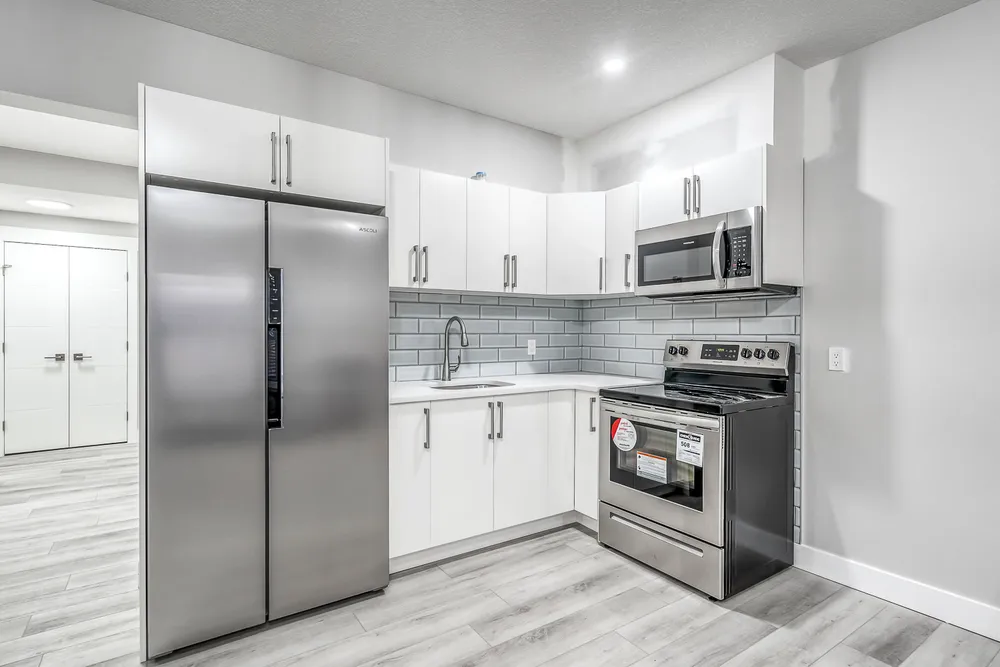
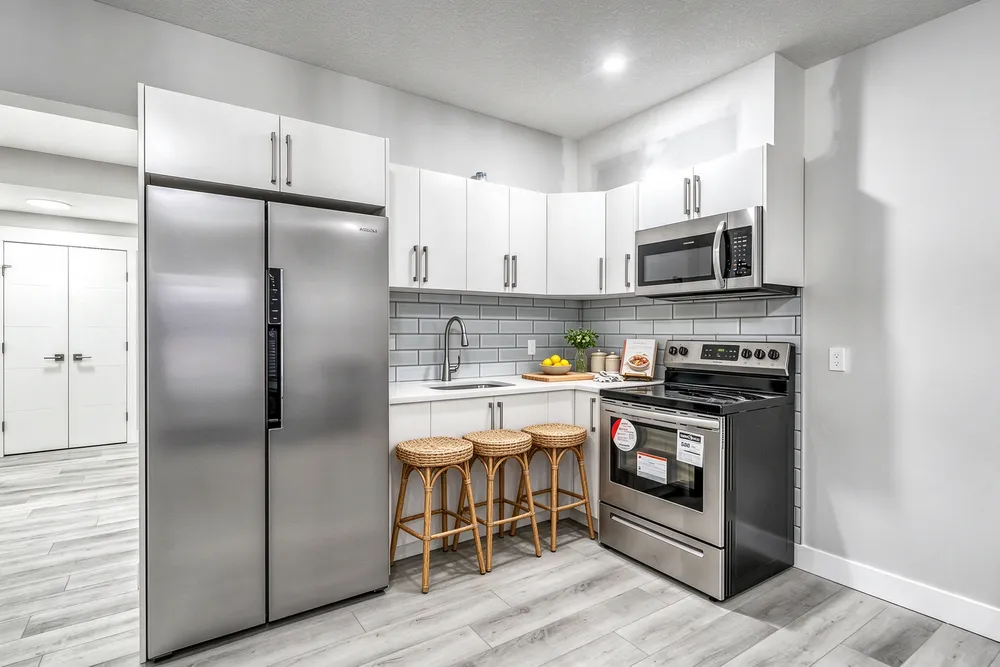
The pair is the empty kitchen and the RenderVibe concept. RenderVibe pricing is the price source for the next section. For a photo-only staging roundup with its own checked date, see free virtual staging tools.
When a concept image is the wrong artifact
A RenderVibe image carries no measurements. It does not measure the room, and agreement between two images does not establish accuracy.
On RenderVibe, the floor-plan guide says a plan image is a concept picture with no measured geometry, and the workflow does not export editable geometry, a BIM model, or a dimensioned construction document. The architectural rendering page says to check windows, stairs, rooflines, and proportions against the drawings. Other vendors on this page describe their own controls. Veras’s product page says specified geometry can stay intact.
What RenderVibe costs after the free image
Promo for accounts created through Dec 31, 2026, 11:59 PM MT: your one free credit makes one image, and you download it watermark-free at full resolution. After that, buy a credit pack or subscribe to keep creating. RenderVibe pricing lists one-time packs that do not expire: Starter at US$4 for 5 credits, Listing at US$19 for 30 credits, and Studio at US$49 for 100 credits. Monthly plans renew until canceled, and unused monthly credits expire at the end of the billing period: Agent at US$19 for 40 credits, and Studio monthly at US$49 for 120 credits. A standard single image costs one credit. The on-screen quote is the charge. Failed generations return their credits. Checkout shows tax.
The figures are on pricing.
Which image formats do these tools accept?
Interior AI’s FAQ lists JPG, PNG, WebP, and AVIF. MyArchitectAI’s pricing FAQ lists JPEG, PNG, and WEBP. RenderVibe’s studio takes JPG, PNG, or PDF, up to 20 MB per file.
Which of these pages state a free start?
Checked 4 November 2026: Veras states 14 days, then automatic billing. Spacely AI’s pricing page states 40 trial credits on a free plan. MyArchitectAI states 10 free renders. REimagineHome states 5 free designs and no card on the homepage. Collov’s matrix states watermarked trial cells, with different counts on different rows. Homestyler Basic states 3 AI credits. Render a House states 3 credits per day. Interior AI’s homepage does not state a free allowance. RenderVibe’s free credit is in the promo above.
Is an AI interior render a measured drawing?
No. RenderVibe’s floor-plan page says its plan images are not measured models and are not exported as editable geometry. If another vendor says its tool keeps the shape of the building, that is the vendor’s claim, and we did not test it.
What does a new RenderVibe account pay after the free image?
The next one-time pack on RenderVibe pricing is Starter at US$4 for 5 credits. You can also subscribe.
Sources
Vendor pages linked here were fetched 4 November 2026.
- Veras: Veras product page; Veras trial page; Chaos pricing
- Spacely AI: Spacely AI pricing; Spacely AI plan post; Spacely AI 2026 tutorial
- MyArchitectAI: MyArchitectAI pricing; MyArchitectAI billing article; MyArchitectAI llms.txt
- REimagineHome: REimagineHome pricing; REimagineHome homepage; REimagineHome FAQ
- Collov: Collov pricing
- Interior AI: Interior AI homepage
- Homestyler: Homestyler pricing; Homestyler AI Boost; Homestyler AI Studio
- Render a House: Render a House homepage; Render a House plans doc
- RenderVibe: RenderVibe pricing; RenderVibe studio; floor plan to rendering; architectural rendering
More RenderVibe guides: furniture and finishes in a photo of a home on AI interior design, one room on AI room design, kitchens on AI kitchen design, and listing furniture on AI home staging. The photo guide covers the shot. The winter vacant listing checklist covers a vacant listing from November through January.