
Guide for home builders, and the listing agents selling their inventory, who need furnished photos of a finished empty spec home
Virtual staging for a finished spec home
Photograph a finished empty spec, add furniture only, check that the finishes did not change, and use the stills on the listing while the house stays empty for walks.
When the spec is finished and empty
A finished spec or a quick-move-in home can sit empty while it is listed. The same is true of standing inventory. Buyers see bare rooms in the photos, then walk the same empty rooms in person. The unsold house still has a holding cost. You can put furnished stills on the listing, the portals and the builder site without moving furniture in.
Photograph each finished room while it is empty. Upload a photo and ask for furniture only. Keep the cabinets, floors, fixtures, windows and the view as they are. Check the still against the photo. If it passes, use it on the listing. If it fails, leave it out. The house itself stays empty for the in-person walk. The still is not a virtual show home and not a walkthrough.
Check the listing rules that apply to you before you publish a virtually staged photo.
What a still from a finished-room photo can show
You upload a JPG or PNG photo up to 20 MB. The result is a still image. RenderVibe does not build a 3D model, a walkthrough, CAD drawings or BIM data. Concepts are not measured drawings.
Write the brief around what stays. A great-room brief can read: "Add a sofa, two chairs, a coffee table and a rug. Keep the windows, the fireplace, the flooring, the ceiling fan and the loft railing unchanged." Do not ask for a change to cabinets, floors or fixtures. Leave wall colour and the view as they are in the photograph. Do not add an upgrade that is not in the house.
If the house is not finished yet, use a different workflow. Concept finishes before they are installed are covered on 3D rendering for home builders.
Check the image against the source photo
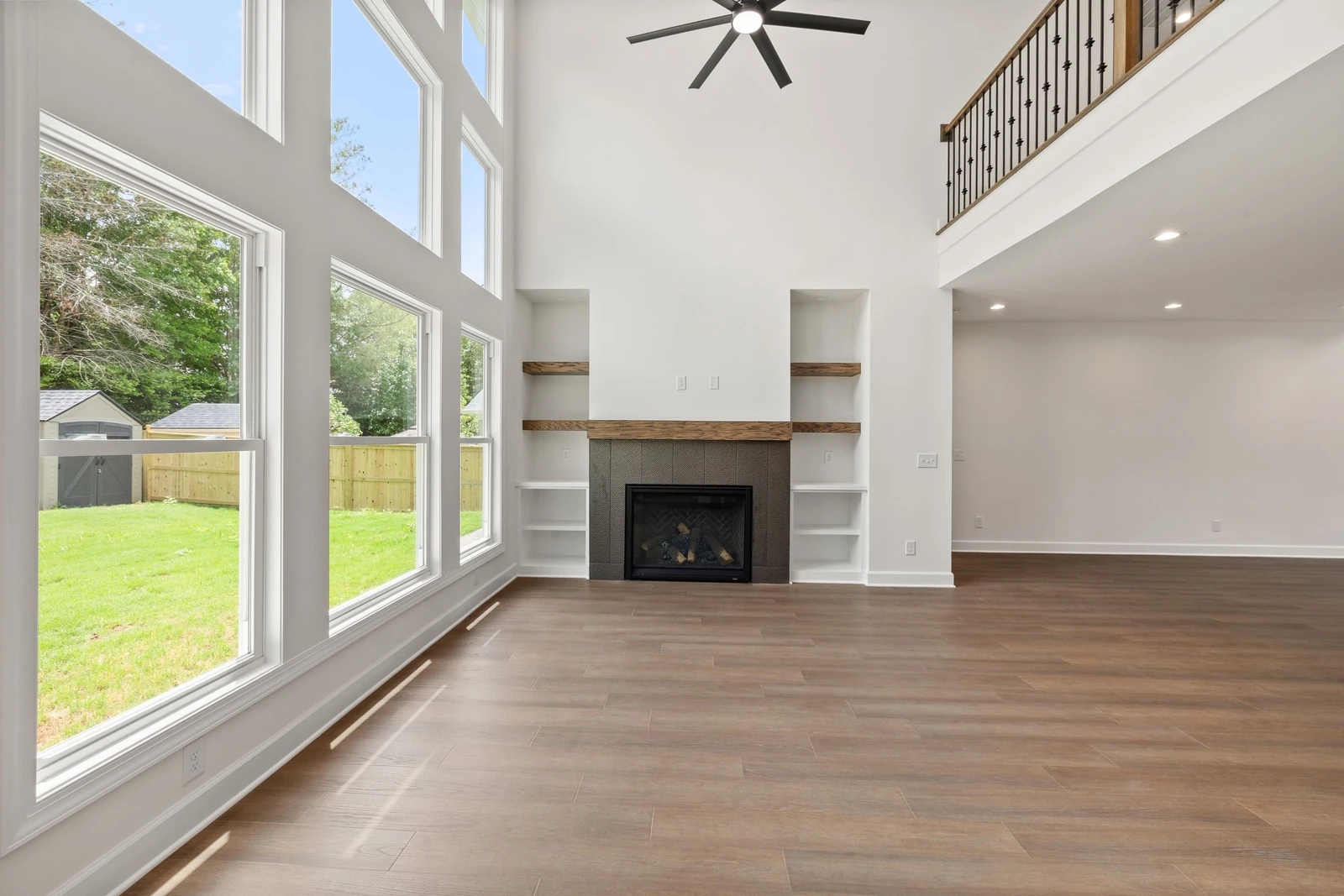
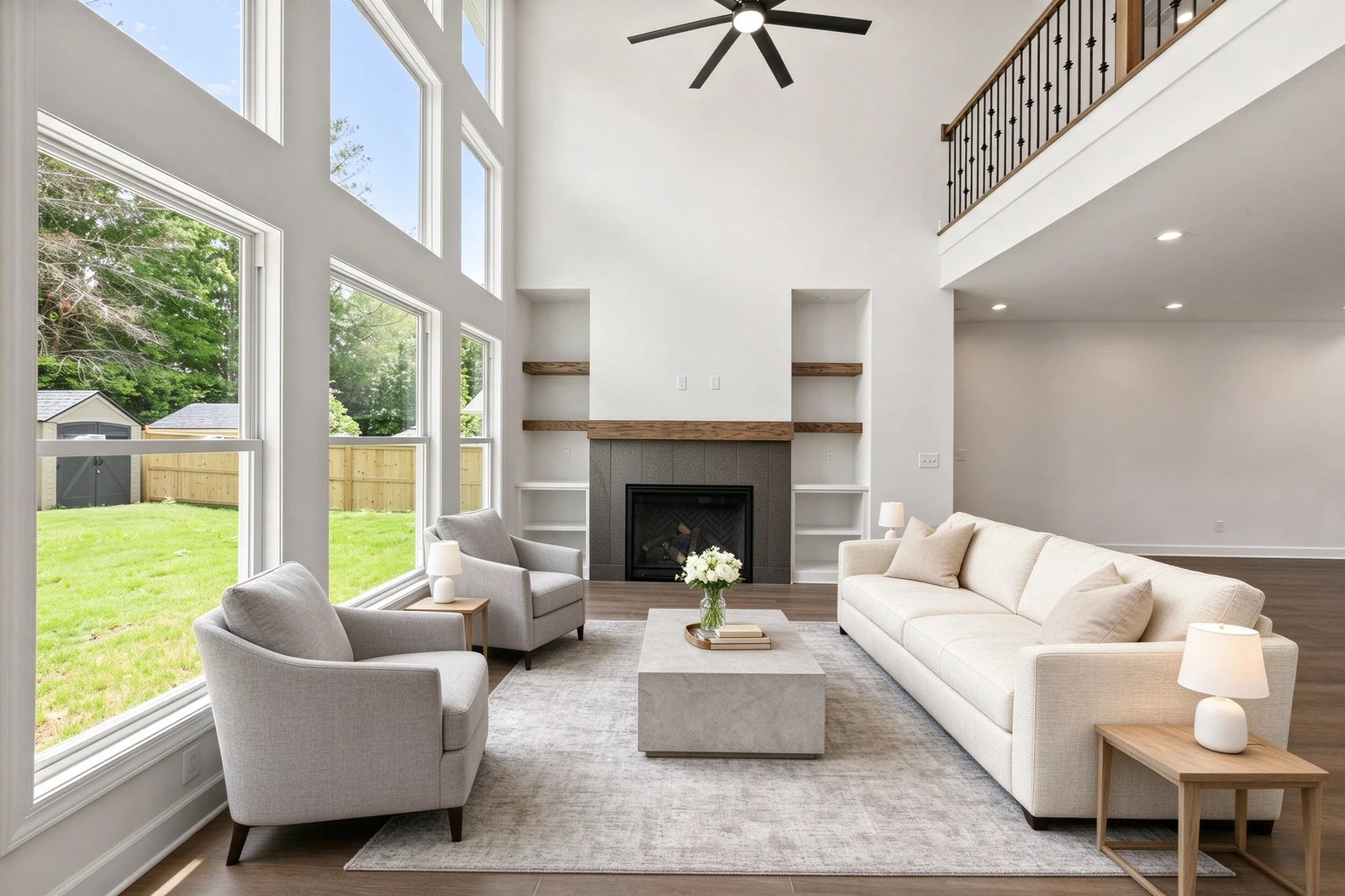
The pair on this page is a demo, not a client spec home and not an independent customer testimonial. The source is a stock photograph of a finished empty great room (Pexels, used under the Pexels License). The concept is a RenderVibe furniture still from an owner-led demo on 30 October 2026. It adds a sofa, two chairs, tables, lamps and a rug. The windows, the backyard view, the fireplace, the built-in shelves, the flooring, the ceiling fan and the loft railing match the source.
Compare every still to its source photo before anyone else sees it. Reject a result that moves a window or changes the floor or the cabinets. Reject one that alters the view or adds a fixture that is not in the house. Keep the photograph as the authority.
Use the stills on the listing and keep the walk empty
Once a still passes your check, you can use it on the listing, the portals and the builder site. Say that the furniture is virtually staged, in the way your listing rules require. The rooms stay empty when a buyer walks the house, so the photos and the visit will not match unless you say so.
Do not use a still to imply a finish or an upgrade that is not in the house. Photographing the rooms is covered on how to photograph a room for virtual staging. For a resale house that is empty, use how to stage an empty house on a budget, which is a different job from builder inventory.
Where a still fits, and where it does not
Use a still to furnish photographs of a finished empty spec. Use another page when the house is not finished, when you are staging a resale, or when you need a modelled render.
| Task | What to use |
|---|---|
| Furnished stills of a finished empty spec | A RenderVibe still from a finished-room photo, checked against that photo |
| Concept finishes before they are installed | 3D rendering for home builders |
| Staging a resale house that is empty | How to stage an empty house on a budget |
| Photographs of the rooms | How to photograph a room for virtual staging |
| A modelled render built to exact drawings | A rendering studio. Published prices are on what home builders pay for architectural rendering |
For more on how builders use RenderVibe, see RenderVibe for home builders. The product workflow for furnished listing photos is also on AI home staging and virtual staging.
What it costs
Promo for accounts created through Dec 31, 2026, 11:59 PM MT: your one free credit makes one image, and you download it watermark-free at full resolution. After that, buy a credit pack or subscribe to keep creating.
Credit packs are one-time purchases and pack credits do not expire. The Studio pack is $49 USD for 100 credits. If you make images every week, Agent is $19 USD/month for 40 credits; Studio monthly is $49 USD/month for 120 credits. Monthly plans renew until canceled and unused monthly credits expire at the end of the period. Cancel anytime. A standard single image costs one credit, and each request shows its credit charge before it runs. Failed generations return their credits. See RenderVibe pricing.
RenderVibe is operated by Melcom Technologies Ltd, Unit 317, 2116 27 Avenue NE, Calgary AB T2E 7A6. That is a mailing address. There is no showroom and no staging crew.
Can I call the result a virtual show home?
No. A RenderVibe result is a still image from a photograph. It is not a show home, a walkthrough or a 3D model. The house stays empty for the in-person walk.
Can I change the cabinets or the flooring in the image?
No. On a finished spec the finishes are already in the house. Ask for furniture only, and reject a still that changes cabinets, floors, fixtures, wall colour or the view.
Will buyers see furniture when they walk the house?
No. The rooms stay empty unless you move furniture in. Say that the listing photos are virtually staged, in the way the listing rules that apply to you require.
What if the house is not finished yet?
Do not furnish a photo of a house that still needs its finishes. Use the guide on 3D rendering for home builders for concept images before those finishes are installed.
What does a RenderVibe concept image cost?
Promo for accounts created through Dec 31, 2026, 11:59 PM MT: your one free credit makes one image, and you download it watermark-free at full resolution. After that, buy a credit pack or subscribe to keep creating. Credit packs are one-time purchases and pack credits do not expire. Agent is $19 USD/month for 40 credits, cancel anytime.