For home builders marketing presale and spec homes, including builders in Canada
Rendering for home builders: concept images for presale and spec homes
How home builders can make concept images of a presale or spec home from a finished-room photo or a PDF plan, what RenderVibe makes and what it doesn't, and what a studio render costs. One free credit, then buy a credit pack or subscribe.
Real RenderVibe before-and-after examples
Reference photos and saved results from RenderVibe tests. These are visual concepts, not photographs of completed work. Briefs below summarize the requests; source credits accompany licensed stock photos.
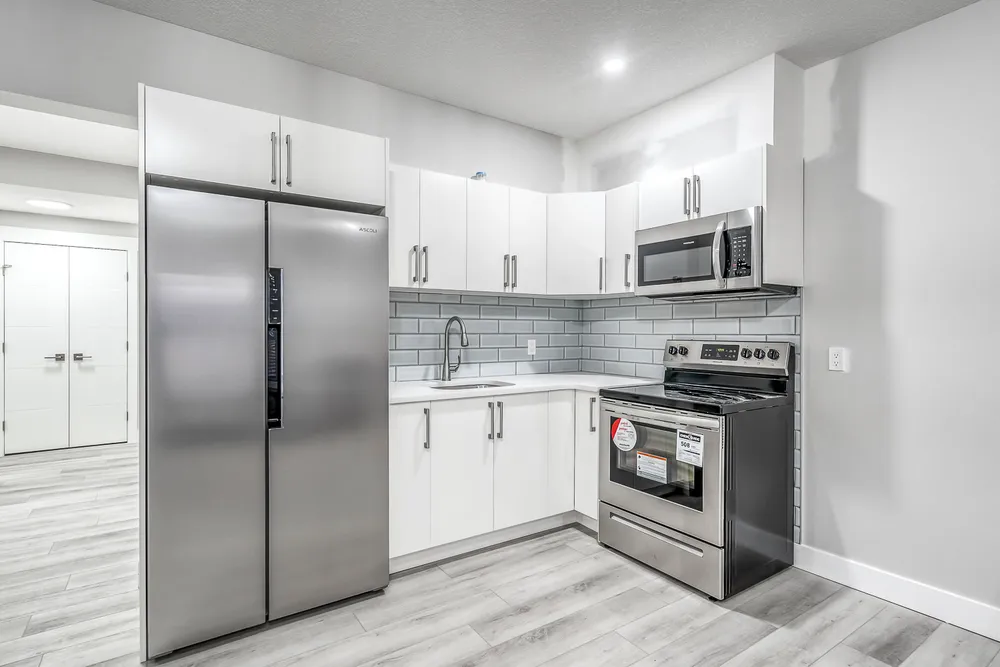
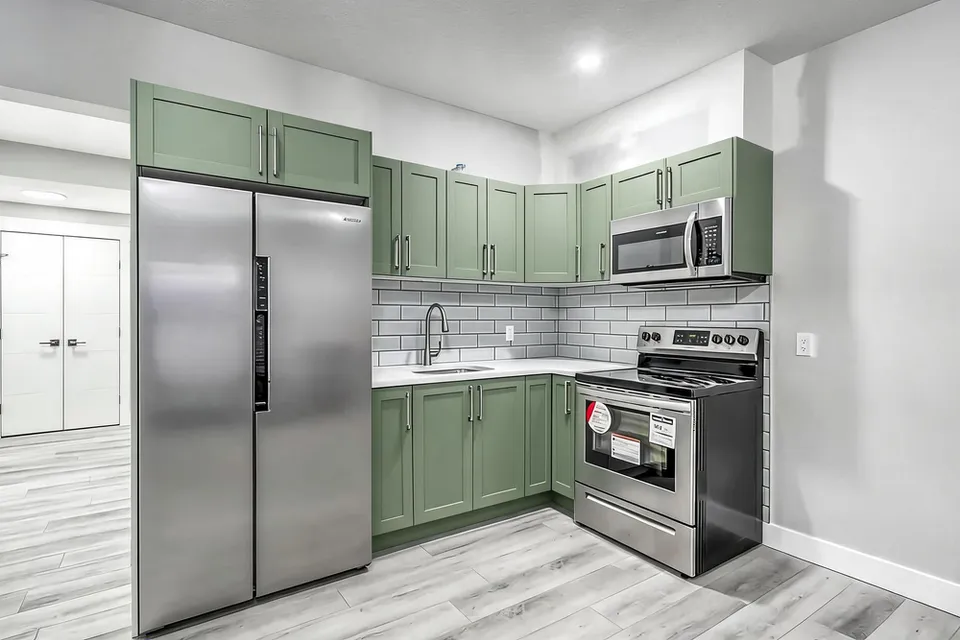
White cabinets to a sage-green kitchen concept
Before · source photoAfter · AI-generated concept
The brief: Repaint every upper and lower cabinet in muted sage green. Keep the flat doors, silver handles, appliances, counters, backsplash and floor; add no furniture.
What to review: The result gives a coordinated green cabinet direction and keeps the floor free of added furniture. It also introduces framed door fronts despite the flat-door instruction. Use this as a colour-and-door-style concept, not an exact preview of repainting the existing doors.
Promo for accounts created through Dec 31, 2026, 11:59 PM MT: your one free credit makes one image, and you download it watermark-free at full resolution. After that, buy a credit pack or subscribe to keep creating. The US$4 Starter pack includes five credits and clean downloads. A standard image uses one credit; check your quote for other requests. Compare all credit packs and monthly plans.
What RenderVibe makes for a builder
RenderVibe makes 2D concept images. You upload a JPG or PNG photo, or a PDF floor plan, up to 20 MB, and describe the finishes you want to show. You get back a still image. RenderVibe doesn't build a 3D model, a walkthrough, CAD drawings or BIM data. If you need a model you can view from any angle, or images tied to exact dimensions, use your design software or a rendering studio. See the architectural rendering guide for how plan projects work.
Presale: show the home before it exists
A presale buyer is looking at a lot and a plan. Start from a photo of a finished room you already built on this plan, a photo of your show home, or the PDF of the plan. Make one image per question: the kitchen in your standard package, the exterior in your two colour schemes. Keep your spec sheet beside each image. For set finish packages, the presale finish packages guide walks through it room by room.
Spec homes: market the finishes you chose
On a spec home you've already picked the finishes. Before those finishes are installed, a concept from a finished room on a past build gives buyers a picture for the listing and the yard sign. Describe only finishes you've ordered. Once the house is finished, swap the concept for real photos.
Write the brief around what stays
Name the change, then name what must stay. For an exterior: "Change the siding to charcoal board and batten and the trim to black. Keep the roofline, windows, doors, garage and driveway unchanged." For a kitchen: "Change the cabinets to white shaker. Keep the layout, island, windows and ceiling unchanged." AI images can move a window or add a detail that isn't there. Check every result against the photo or plan.
For builders in Canada
Prices on RenderVibe are in US dollars, and checkout shows applicable tax before you pay. If you market presale homes in a province with its own rules for presale or new-home advertising, check those rules before you publish a concept image. Keep the signed spec sheet as the record of what the buyer gets.
What a studio render costs, for comparison
Studio renders are built from a 3D model and priced per image. Bella Virtual lists a residential interior at $550 USD and a single-building exterior at $750 USD (bellavirtual.com, checked Nov 4, 2026). Aurum Render's survey of 16 studios' published prices found a median starting price of $500 USD for one exterior and $375 USD for one interior (14 of the studios list interiors), read October 8, 2026 (aurumrender.com). A studio gives you a modeled image to exact drawings. RenderVibe gives you quick concept images from a photo or plan. Use a studio for an image built to the drawings. Use RenderVibe for a quick concept from a photo or a plan.
What it costs
Promo for accounts created through Dec 31, 2026, 11:59 PM MT: your one free credit makes one image, and you download it watermark-free at full resolution. After that, buy a credit pack or subscribe to keep creating.
Credit packs are one-time purchases and pack credits do not expire. The Studio pack is $49 USD for 100 credits. If you make images every week, Agent is $19 USD/month for 40 credits; Studio monthly is $49 USD/month for 120 credits. Monthly plans renew until canceled and unused monthly credits expire at the end of the period. Cancel anytime. A standard single image costs one credit, and each request shows its credit charge before it runs. Failed generations return their credits. See RenderVibe pricing.
Is this 3D rendering?
No. RenderVibe makes 2D still images from a photo or a PDF plan. It doesn't create a 3D model, CAD or BIM files.
Can I upload a SketchUp, Revit or CAD file?
No. Uploads are JPG, PNG or PDF. You can export a view from your design software as a PNG and upload that, then check the result against your drawings.
Can I use a concept image to market a presale home?
Show only finishes you offer. If you market presale homes in a province with its own rules for presale or new-home advertising, check those rules before you publish. Keep your spec sheet and the buyer's signed selection as the record.