For residential builders and renovation contractors
Builder finish selections with a written record
Record cabinet, colour, and product selections in RenderVibe, separate from the AI concept. Download a finish summary and keep customer approval distinct from a builder lock.
Real RenderVibe before-and-after examples
Reference photos and saved results from RenderVibe tests. These are visual concepts, not photographs of completed work. Briefs below summarize the requests; source credits accompany licensed stock photos.
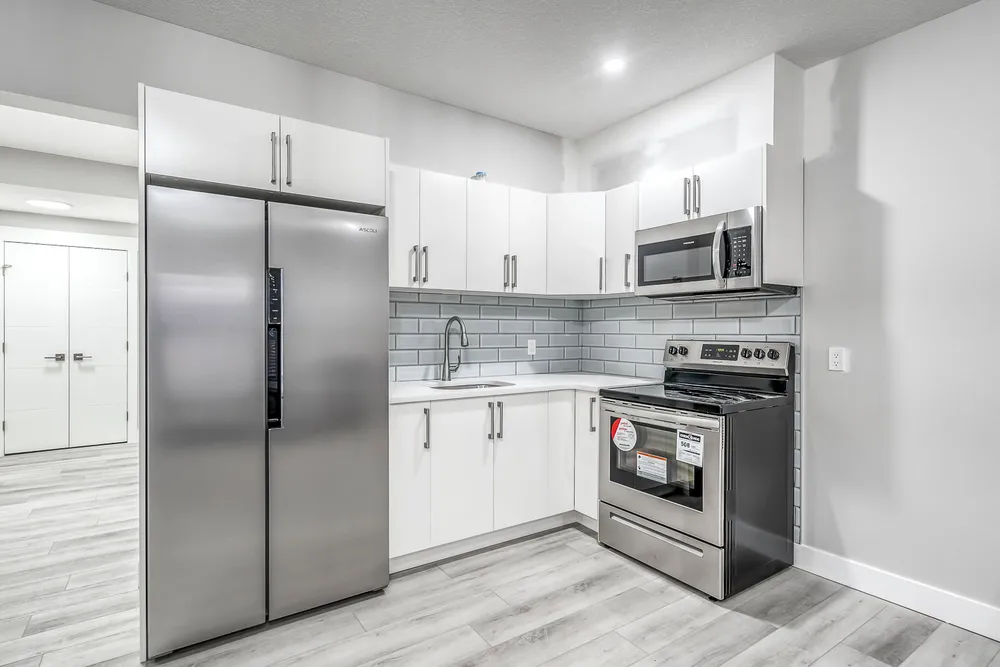
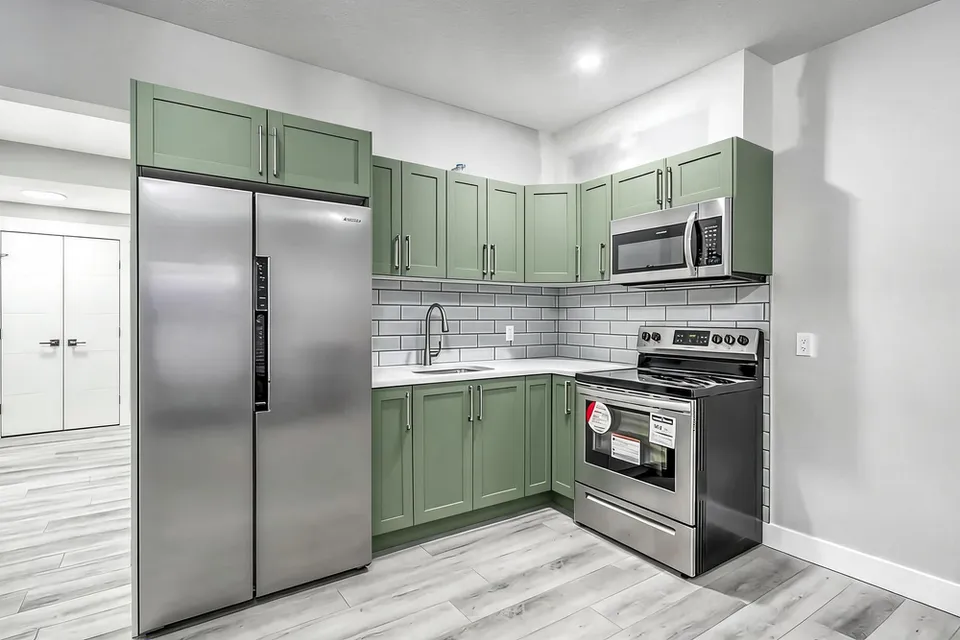
White cabinets to a sage-green kitchen concept
Before · source photoAfter · AI-generated concept
The brief: Repaint every upper and lower cabinet in muted sage green. Keep the flat doors, silver handles, appliances, counters, backsplash and floor; add no furniture.
What to review: The result gives a coordinated green cabinet direction and keeps the floor free of added furniture. It also introduces framed door fronts despite the flat-door instruction. Use this as a colour-and-door-style concept, not an exact preview of repainting the existing doors.
A new account gets one starter credit for a watermarked preview. The US$4 Starter pack includes five credits and clean downloads. A standard image uses one credit; check your quote for other requests. Compare all credit packs and monthly plans.
The image is not the selection
A buyer can point at a green kitchen and still not have chosen a paint code, a door profile, or a supplier. RenderVibe keeps those as written selections on a property: material, colour, product, and notes, plus the image you attached for discussion. The concept helps the conversation. The selection is the record. This page is about that record. The wider invite-and-approve story is on finish selections and buyer approvals. The founder context is an owner-led pilot, not a stack of customer testimonials. Use one property and one finish question before you roll the habit out to a whole slate of homes.
What a saved selection contains
In Properties and approvals, create the property and add a selection such as kitchen cabinetry. Write the material, the colour, the product or specification, and any notes about exclusions. Attach the design image separately so a later concept does not silently replace the words. A sample summary, marked fictional, shows the fields a download can include: revision, material, colour, product, notes, design image id, signer, time, and an approval id when a customer has signed. Open the sample finish summary. It is not a customer file. In a live property, Download finish summary produces the same kind of sheet from what you saved. Use the browser Print command if you need a PDF. The sheet is a snapshot. Check the property again before you order.
Builder lock is not the buyer's signature
You can lock a selection when you are ready for review. That lock records your proposal. It does not record the buyer's agreement. The customer signs in with their own account, reviews the saved selection, and signs that revision. The approval stores the signer, the time, and a snapshot of the selection. A buyer can sign a builder-locked selection without editing it first. Later changes go through a change request. You can describe a fee or a schedule impact. The customer has to accept that change before a new revision opens. Older signed records stay in the history. None of this is a construction contract or a substitute for your specification book.
Invite the person who will actually sign
In People, invite the email address the buyer will use. The app does not send that invitation for you. You copy the link and give it to them. The link is bound to that email and it expires. A colleague can walk the path once: invitation, saved choice, builder lock, customer sign-off, downloaded summary. If any step is confusing, fix it on the sample property before a real buyer is waiting on a Saturday. Photo reviewers you add for comments do not get the signed selections or the builder settings. Keep those roles apart.
Use a concept only to frame the choice
The kitchen pair on this page asks for sage-green cabinets. The result also changes flat doors to framed fronts. If your allowance is paint on the existing doors, the image is the wrong specification and the written selection should say so. Do not let the picture overwrite the product line. For a cabinet brief, use AI kitchen design. For a vanity or tile discussion, use bathroom finishes. A new account has one watermarked starter credit. The US$4 Starter pack is five credits and clean downloads. Read the quote before you generate a second option. Then return to the property and write down the finish the buyer actually approved. Marketing photos of a finished listing are AI home staging, which is a different job from a selection record.
Does the finish summary replace the specification?
No. The summary lists what was saved in RenderVibe at export time: material, colour, product, notes, and the approval state. Your supplier quote, drawings, and contract still govern the work. Verify the current revision before ordering.
Can the builder approve for the buyer?
A builder lock is only the builder's proposal. Customer approval is a separate signature with a name and a time. Do not describe a lock as the buyer's acceptance.