Explore AI bathroom design before choosing finishes
See a real RenderVibe bathroom colour comparison, then use your own photo to explore vanity finishes. Review the source, brief and AI result together.
Plan your first design brief
Choose a direction before opening the studio. Your choices carry through sign-in into an editable brief. Upload your own photo there and review the quote before generating.
One starter credit per new account gives a watermarked preview. A standard image uses one credit; other requests can cost more. Paid credits unlock clean downloads. Selecting options here costs nothing.
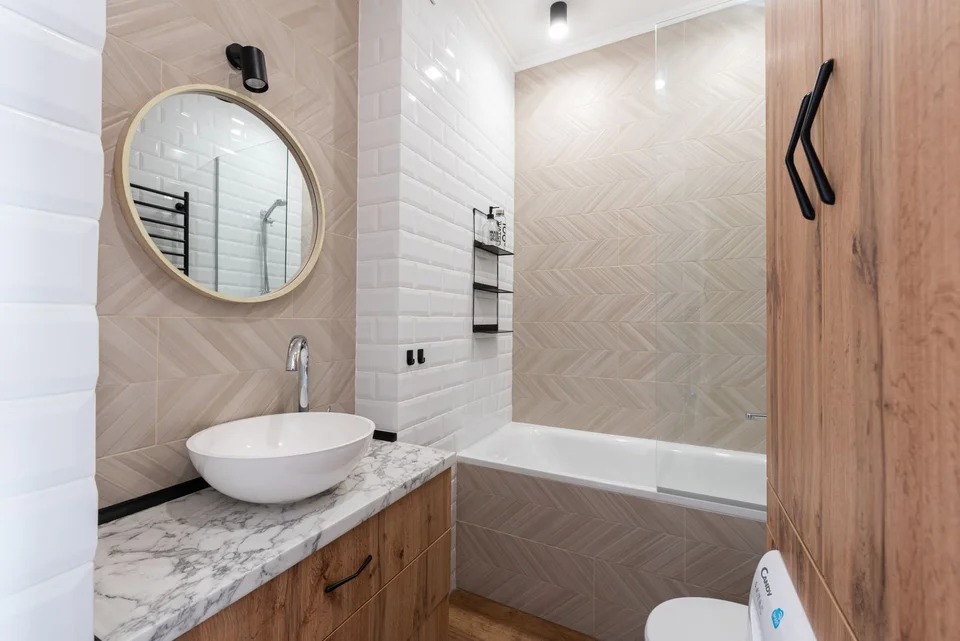
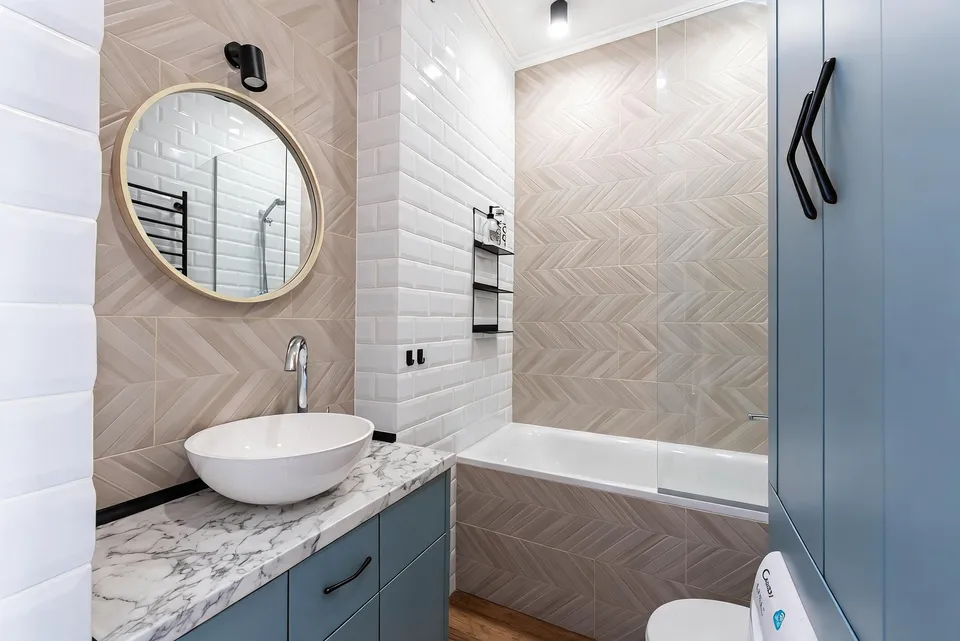
Reference photos and saved results from RenderVibe tests. These are visual concepts, not photographs of completed work. Briefs below summarize the requests; source credits accompany licensed stock photos.
The brief: Change only the wooden vanity and tall cabinet to matte dusty blue. Keep the beige herringbone bath-front tiles, white basin, marble counter, mirror, bathtub and glass screen.
What to review: The revised concept keeps the bath front beige and gives the cabinetry a blue finish. Review drawer divisions, handles, reflections and tile detail against the original. This is a palette study; it does not specify a paint product or verify cabinetry dimensions and wet-area suitability.
A new account gets one starter credit for a watermarked preview. The US$4 Starter pack includes five credits and clean downloads. A standard image uses one credit; check your quote for other requests. Compare all credit packs and monthly plans.
Start with a visual decision
Choose one question your bathroom concept should answer: a lighter vanity finish, a warmer tile palette, a different mirror shape or a simpler decorative scheme. A photograph helps ground the request in the bathroom you have. The comparison above uses a licensed stock bathroom photo and a result generated in RenderVibe. It shows a cabinet-colour experiment, with the source credited beside the images. Generated images can support a discussion with a designer or contractor, but they cannot establish plumbing feasibility, waterproofing details or installation requirements. Treat the output as an illustration of a preference that still needs practical review.
Keep fixtures and openings explicit
For an initial finish study, ask to retain the toilet, basin, shower, bathtub, doors and windows in their current positions. Name any fixture that is partly hidden in the photo so its location remains part of the brief. Moving plumbing is a different project from changing a colour, and a generated image will not reveal the work needed behind a wall or floor. If you want to explore a new arrangement, discuss measurements and feasibility with the appropriate professional before interpreting the proposed image as a plan.
Prepare a useful reference photo
Photograph the space with enough light to distinguish surfaces and edges. A view that includes the vanity, floor and adjacent doorway is useful for a vanity study. Mirrors can make a bathroom’s geometry ambiguous; explain which features are reflections when needed and inspect those areas closely in the result. Avoid including people or personal information in the reference. If the room cannot be shown in one photograph, choose the view most relevant to the change instead of expecting separate generated angles to form a consistent measured model.
Try a precise finish brief
Our published test asks for dusty-blue wood cabinet surfaces while keeping the basin, marble counter, round mirror, bath, glass screen and tiles. The revised brief names the beige herringbone bath front explicitly because the first attempt coloured that tiled surface too. Use “Try a new look” for a finish concept and inspect the full quote before confirming. Adapt the surfaces in this brief to your photograph; a bath panel that resembles cabinetry may need a separate preservation instruction. Compare one or two material decisions at a time. If the image changes a fixture you asked to preserve, revise that request before relying on the comparison.
Check details that an attractive image can hide
Review mirror reflections, tap placement, basin edges, shower screens and the relationship between cabinet doors and nearby fixtures. Look for duplicated fittings or an apparently larger room. Check whether the image has silently changed a threshold, window or wall. Real product dimensions, clearances and material suitability must be checked separately. An AI-rendered tile does not identify an available product, and a depicted finish does not establish that it is appropriate for a wet area. Use manufacturer information, samples and qualified project advice when moving from a concept to work.
Know the cost before another iteration
A new account receives one starter credit for a watermarked preview. A standard single image uses one credit, while other requests may have a different quote. Review that quote before confirming the generation. The US$4 Starter pack includes five credits and clean downloads. Choose a specific first experiment so the result can answer a clear question; changing the entire room at once can make it difficult to isolate a preferred finish. Additional versions use credits, so review the first image carefully and make the next brief more precise.
Build a coherent direction across rooms
A bathroom palette can be considered alongside your kitchen design or broader interior design ideas without requiring every room to look identical. If you are preparing listing photos, use AI home staging and preserve the actual property rather than presenting proposed renovation work as existing. The button below opens a bathroom brief you can edit. Upload a reference, name the surfaces you want to explore, review the quote, and compare the output with the source before sharing it.