Guide for Alberta realtors, stagers and house flippers
Virtual staging disclosure rules in Alberta
Alberta MLS rules allow virtually staged photos if disclosed in the public remarks. See what counts as a prohibited enhancement and how CREB enforces it.
Real RenderVibe before-and-after examples
Reference photos and saved results from RenderVibe tests. These are visual concepts, not photographs of completed work. Briefs below summarize the requests; source credits accompany licensed stock photos.
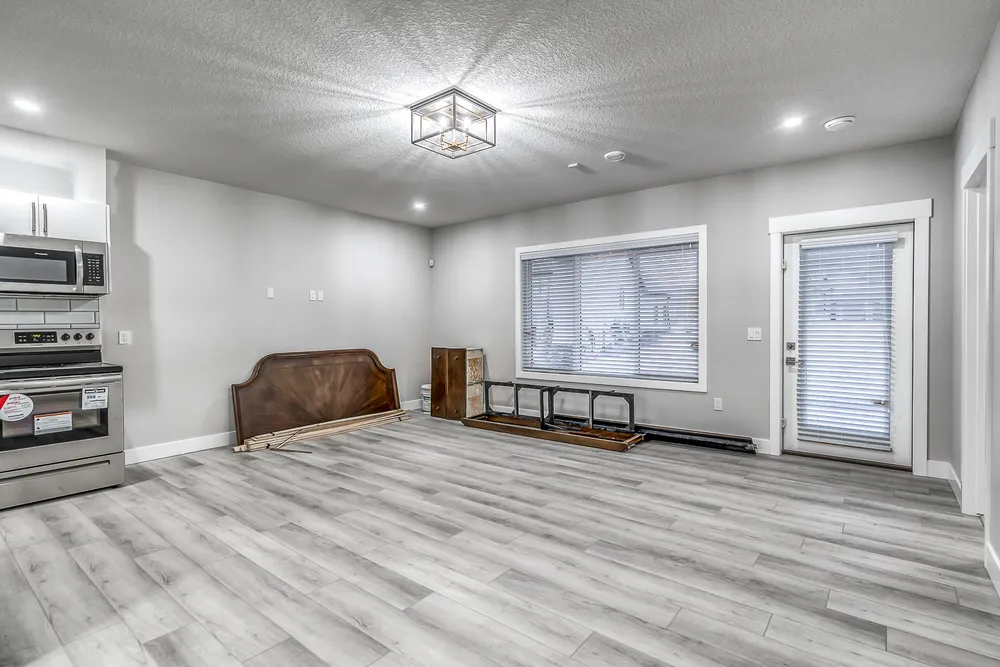
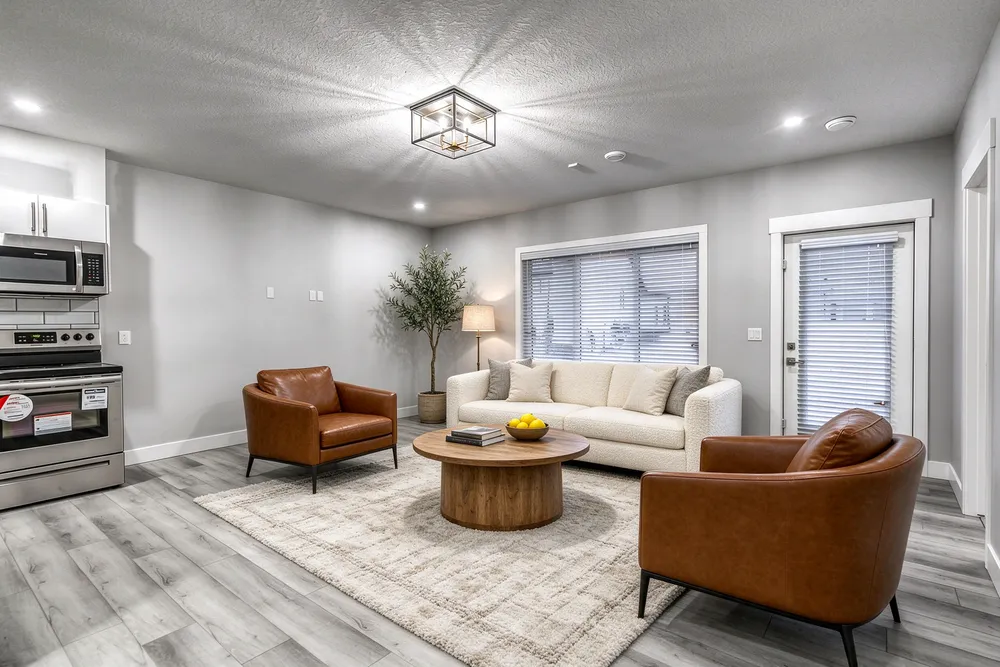
From a cleared room to a living-room concept
Before · source photoAfter · AI-generated concept
The brief: Add a cream sofa, cognac chairs, an oak coffee table and a textured rug. Remove stored furniture pieces and keep the room’s existing finishes.
What to review: The result illustrates a seating arrangement around the existing window and door. Compare the floor, openings and furniture scale with the source before using it.
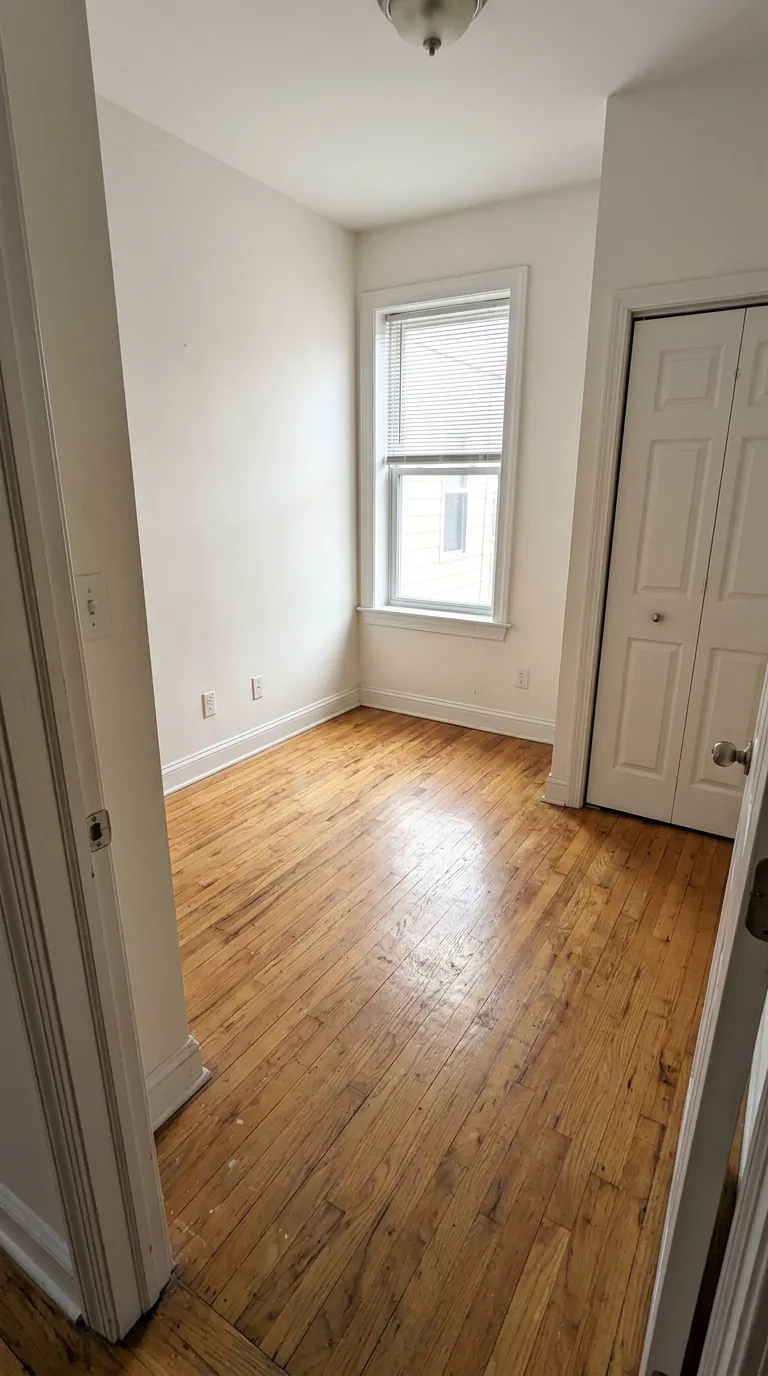
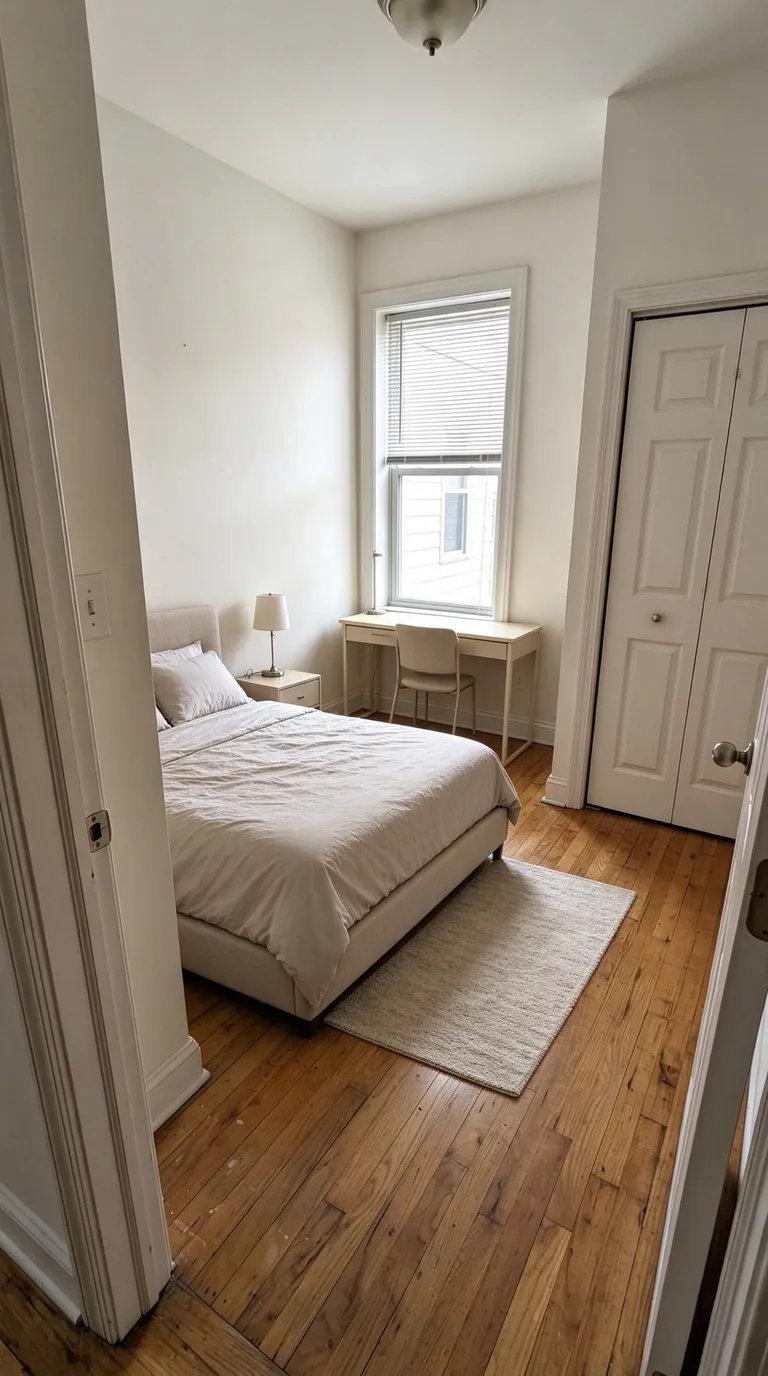
A compact bedroom with a study area
Before · source photoAfter · AI-generated concept
The brief: Add a bed along the left wall, a desk under the window, a nightstand and a small rug. Keep the closet accessible.
What to review: The concept explores how sleeping and study areas could share a small room. It does not verify that the furniture fits; measure circulation and closet clearance separately.
A new account gets one starter credit for a watermarked preview. The US$4 Starter pack includes five credits and clean downloads. A standard image uses one credit; check your quote for other requests. Compare all credit packs and monthly plans.
The short answer
You can use virtually staged photos on an Alberta MLS listing. Two conditions apply. The listing brokerage has to say so in the public remarks, and the images can add furniture and decor but cannot change the home. Both come from the Provincial MLS System Listing and Practice Rules for Alberta REALTORS (January 2024 edition). In March 2026, Real Estate Magazine reported that the Calgary Real Estate Board (CREB) was flagging non-compliant images weekly, as described below. The relevant parts are the definitions of virtual staging and virtual enhancing, rules 2.04(b), (c), (d), (e), (g), (h) and (i), and rule 6.05 on misleading advertising. This is a plain-language summary, not legal advice, and boards revise their rules, so check the current edition and your board before relying on a detail.
Staging adds things. Enhancing changes the house.
The rules draw the line in two definitions. Virtual staging is "adding virtual unattached goods (chattels) of realistic size to property photos in order to give perspective on room dimensions." Virtual enhancing is "virtually changing, adding, or augmenting features on property photos that would materially affect the property value," and the rules name walls and changes to "the layout, locations, size, or type of windows" as examples. Picture an empty two-bedroom condo in the Beltline. Putting a sofa, a rug and a floor lamp into the living room photo is staging. Knocking out the wall to the kitchen or widening the window is enhancing, and swapping the carpet for hardwood very likely is too, because flooring is part of the property and affects its value. Staging is allowed with disclosure. Enhancing is not allowed on the MLS system at all.
Where the disclosure goes
Rule 2.04(g) covers virtually staged images, show home or show suite images, and artist's renderings. When a listing uses any of them, "the Listing Brokerage must disclose this fact in the public remarks" on the board's MLS system. The rule sets no wording and asks only that the fact be disclosed, so a single line in the remarks, such as "Some photos are virtually staged," should cover the gallery. If your brokerage has a stock sentence, use it. The duty sits with the listing brokerage, but whoever prepares the photos should read the remarks before the listing is published.
No logos or labels on the photo
Rule 2.04(b) says photos and renderings "shall not include any wording or other embellishments not related to the property," including logos, advertisements and member contact details, "or any messages other than 'Sample Photo'." A stager's logo or a software watermark therefore cannot appear on an MLS photo. A "Virtually staged" caption stamped on the image is a grey area. The rule's only named exception is "Sample Photo," and the CREB and RECA pages we checked in October 2026 do not address captions. Until your board says otherwise, keep the image clean and put the disclosure in the remarks, which is where rule 2.04(g) asks for it. If your staging tool watermarks free previews, upload the final clean file. One more rule from the same section catches some AI staging output: rule 2.04(i) says images uploaded to the MLS system "shall not contain any persons," so a staged living room should not include a figure on the sofa.
Misrepresentation is the wider test
Rule 2.04(h) reads: "Virtually Enhanced images, or any photos that may misrepresent the property, are not permitted" on the board's MLS system. That second clause catches edits that never touch a wall. Take a 1960s bungalow in Bowness with a water stain on the basement carpet. A virtual area rug placed over the stain adds a chattel, but it also hides a defect a buyer would see at the showing. The same goes for digitally patching a cracked ceiling, replacing a view of the neighbour's garage with a green yard, or using a loveseat scaled down so a small bedroom looks roomy. The staging definition requires goods "of realistic size," so undersized furniture is a problem too. A useful question before upload: would a buyer who walks in holding this photo find something that is not there, or miss something that is? If yes, keep it off MLS.
Your website and social posts
The image rules in section 2.04 apply to the board's MLS system. Advertising elsewhere, such as your brokerage site, Instagram or a feature sheet, falls under the Real Estate Act and its rules, administered by the Real Estate Council of Alberta (RECA), which prohibit misleading advertising. Rule 6.05 of the MLS rules sets a similar standard for members: a member "will not use advertising that is inaccurate, misleading or in any way misrepresents the Member's services or the Seller's property." We did not find RECA guidance aimed specifically at virtual staging or AI images (searched October 2026). If a photo would be refused on MLS for misrepresenting the home, do not run it in a social ad either.
CREB virtual staging rules: how enforcement works
In March 2026, Real Estate Magazine reported that CREB overhauled its AI policies in 2025. CREB chair Susanita de Diego said non-compliant images were being flagged weekly, mostly by CREB's member practice advisors, under an "inform then enforce" approach. A first offence gets an educational advisory. Repeat violations draw escalating fines, and a fourth brings a disciplinary hearing. The article did not give the fine amounts. The article also described a 2024 British Columbia case in which the regulator upheld a $6,000 penalty over photos that had been altered to hide peeling paint and show furnishings that did not exist. That case was decided under BC rules, not Alberta's, but hiding peeling paint is exactly the kind of edit that rule 2.04(h) keeps off Alberta's MLS system.
A pre-upload checklist for staged listing photos
Run five checks on each staged image before it goes on an Alberta MLS listing. First, put it next to the original and confirm the walls, windows, flooring and fixtures match. Second, check the furniture scale: a queen bed should look like a queen bed, and doorways and walkways should stay clear. Third, look at what the new furniture and rugs sit on top of, and make sure none of it covers a stain, a crack or damaged trim. Fourth, strip any logo, watermark or contact details. Fifth, confirm the disclosure line is in the public remarks. Then save the unedited original with the listing file, so you can answer quickly if the board asks how the image was made. Stage from your own original file, not a copy downloaded from the MLS system. Rule 2.04(c) says images uploaded to the MLS system "become the property of the Board," rule 2.04(d) says "Any alteration of an image owned by the Board is prohibited," and rule 2.04(e) says members shall not use images from active or previous listings "without the written consent of the former Listing Brokerage." A level, evenly lit source photo makes the side-by-side comparison much easier. Our guide to photographing a room for virtual staging covers framing and light.
Writing a brief that stays inside the rules
AI staging tools sometimes alter things they were not asked to touch, such as a window frame or a floor colour. Tell the tool what must stay before you tell it what to add: "Keep the walls, windows, flooring and view exactly as they are. Add a mid-size grey sofa, a round oak coffee table and a wool rug." Then check the result anyway. Leave paint, flooring and view changes out of any brief for an MLS photo. If a seller in Mount Royal wants buyers to see what the dated kitchen could become, produce that as a separate renovation concept, label it, and keep it out of the MLS photo set unless your board confirms it can run as a disclosed artist's rendering. The virtual staging prompt guide has more examples.
Where RenderVibe fits
RenderVibe turns a listing photo and a written brief into a staged image. It does not check images against board rules or write disclosure text. That stays with the brokerage. New accounts get one credit for a watermarked preview, and further images use paid credits (pricing). For local notes, see virtual staging in Alberta and virtual staging in Calgary.
Is virtual staging legal in Alberta?
Under Alberta's MLS rules, yes. They allow virtually staged photos that add realistically sized, unattached furniture and decor, as long as the listing brokerage discloses the staging in the public remarks. Photos that change the property or may misrepresent it are not permitted on the MLS system.
Do I have to post the original, unstaged photo next to the staged one?
Rule 2.04 does not require it. The disclosure it asks for goes in the public remarks. Keep the original on file anyway, and check whether your brokerage has its own policy.
Can I remove the seller's furniture and replace it virtually?
The rules define staging as adding unattached goods and say nothing directly about removing them. Clearing out a seller's furniture to show an empty room may be acceptable, but ask your board first. Never remove anything that is part of the house, or anything that hides a defect.
Does a virtual paint colour or new flooring count as staging?
No. Paint and flooring belong to the property, not the chattels, so changing them would likely count as virtual enhancing, which the MLS rules prohibit. Show finish changes as a labelled renovation concept outside the MLS photo set unless your board confirms otherwise.
Who is responsible if a staged photo breaks the rules?
Mainly the listing brokerage. The Alberta MLS rules say the listing brokerage "is responsible and accountable for the accuracy of information submitted to the Board for inclusion in the Board's MLS® System," and rule 2.04(g) gives the disclosure duty to the listing brokerage. Individual members are covered too: rule 6.05 says a member "will not use advertising that is inaccurate, misleading or in any way misrepresents the Member's services or the Seller's property." Whoever produced the image, the brokerage should review it before upload.